
An AI chatbot is a website tool that answers customer questions, captures enquiries, qualifies leads, and guides visitors toward the next step, such as booking an appointment, requesting a quote, or speaking with staff. For many Australian SMEs, it works like a 24/7 digital receptionist that helps reduce missed enquiries, improve response times, and support after-hours customer enquiries without replacing human support.
Many service businesses, clinics, tradies, ecommerce brands, and professional services firms use AI chatbots to improve lead quality and reduce repetitive admin work. The results usually depend on how well the chatbot connects with booking systems, CRM workflows, customer support processes, and the overall website experience.
What Does an AI Chatbot Actually Do?
A properly configured AI chatbot can help a business website:
- answer common customer questions instantly
- capture enquiries before visitors leave the website
- qualify leads using simple questions
- route visitors to the correct service or department
- support bookings and quote requests
- escalate conversations to human staff when needed
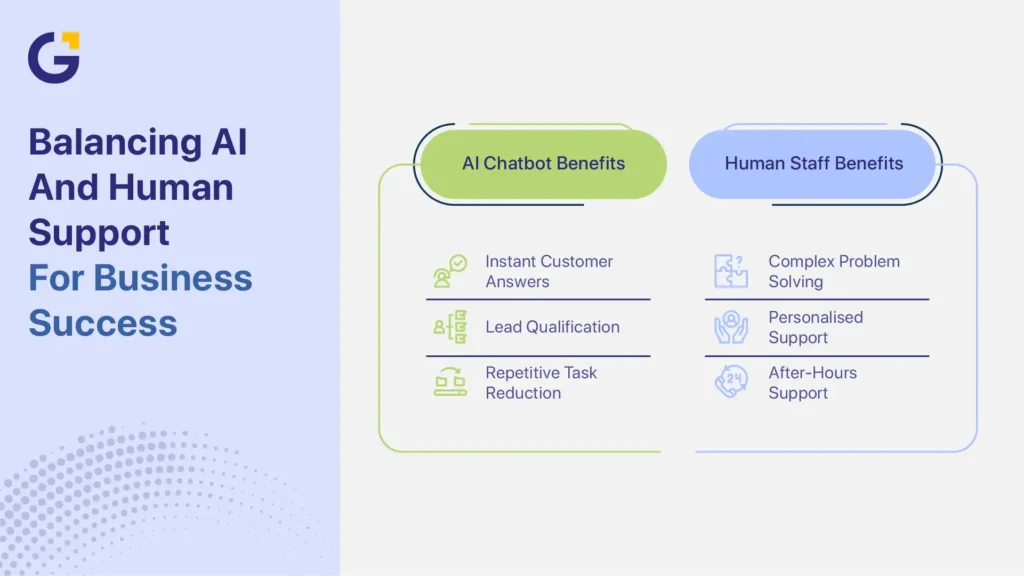
- reduce repetitive admin and support tasks
- improve after-hours enquiry capture
For many local businesses, the chatbot becomes part of the overall sales and customer support process rather than just another website feature.
Not All Website Chatbots Are the Same
Many SMEs assume all chatbots work the same way, but there are major differences between a basic website widget and a properly integrated AI chatbot system.
| Tool | Main Purpose | Best For | Main Limitation |
| Contact Form | Collect basic enquiries | Simple websites | Slow response times |
| Live Chat | Human conversations | Sales or support teams | Requires staff availability |
| Basic Scripted Chatbot | Pre-set automated replies | FAQs and simple routing | Limited flexibility |
| AI Chatbot | Lead qualification and customer engagement | SMEs handling regular enquiries | Requires setup and optimisation |
| CRM or Booking-Connected Chatbot | Lead routing, automation, follow-up | Businesses managing larger lead volumes | More complex implementation |
For example, a WordPress website can use plugins like Jotform AI Chatbot or AI Engine for basic chatbot functionality. However, more advanced setups usually require proper planning around conversation flow, CRM integration, booking systems, follow-up automation, and mobile usability.
A chatbot plugin alone does not create strong conversion results. The surrounding workflow matters just as much as the AI tool itself.
The Practical Jobs of an AI Chatbot on a Website
An AI chatbot for Australian SMEs can help answer common questions, collect lead information, support bookings, and reduce enquiry delays. The best chatbot systems improve business operations while still giving customers clear access to human support when needed.
Answering Common Customer Questions
Many businesses receive the same questions every day. Customers often ask about:
- pricing
- service availability
- appointment times
- service areas
- delivery information
- refunds or returns
- emergency support availability
An AI customer service chatbot can answer these questions immediately instead of making visitors wait for an email reply or callback.
This matters because many users leave a website when answers are difficult to find, especially on mobile devices, where patience is lower.
For example:
A Sydney plumber may use a chatbot to:
- ask whether the issue is urgent
- confirm the suburb location
- explain emergency call-out availability
- route urgent jobs directly to phone support
A dental clinic may use a chatbot to:
- explain appointment availability
- identify emergency dental enquiries
- answer payment or insurance questions
- route patients toward online booking
An e-commerce business may use a chatbot to:
- answer delivery questions
- explain return policies
- check product availability
- guide customers toward support
This reduces repetitive admin work while helping customers get faster answers.
Capturing and Qualifying Enquiries
A website chatbot for lead generation can collect enquiries while visitors are actively engaged instead of relying only on a traditional contact form.
Rather than presenting a long form immediately, the chatbot can ask one question at a time to keep the interaction simple and mobile-friendly.
Common qualification questions may include:
- What service do you need help with?
- Which suburb are you located in?
- Is this urgent?
- What type of property is involved?
- When do you need help?
- What is your approximate budget range?
- Would you prefer a call, email, or booking link?
These questions help businesses improve lead quality before staff become involved.
For example:
An accountant may use a chatbot to separate tax enquiries, bookkeeping support, payroll services, and business advisory enquiries
An NDIS provider may use a chatbot to:
- identify required support services
- check participant location
- understand urgency
- determine whether the enquiry matches service availability
This improves response efficiency and reduces time spent handling unsuitable enquiries.
Routing Leads Into the Right Workflow
Lead capture only matters if the business follows up properly afterward.
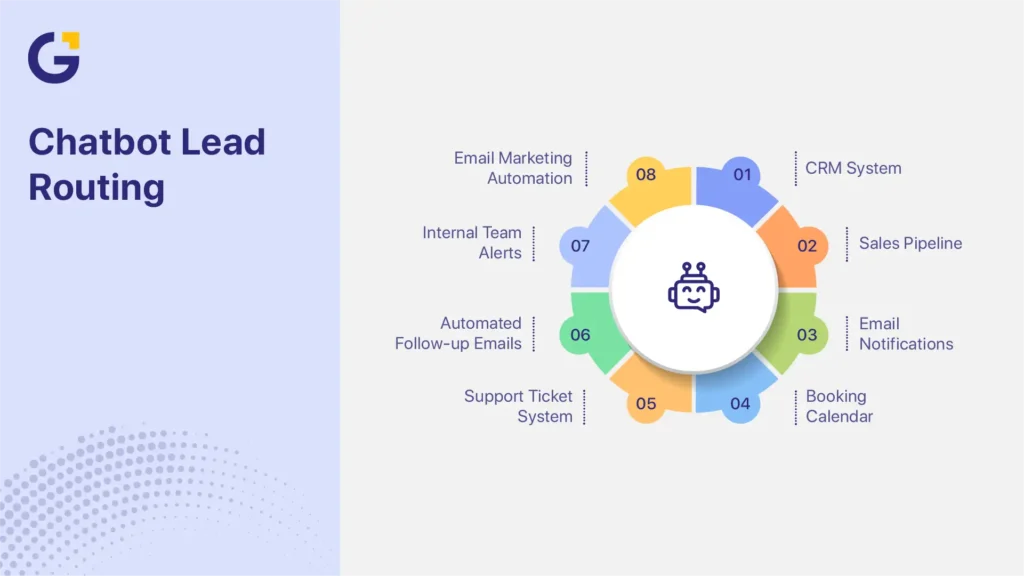
Once a chatbot captures an enquiry, the information may be routed into:
- a CRM system
- an internal sales pipeline
- email notifications
- a booking calendar
- a support ticket system
- automated follow-up emails
- internal team alerts
Many SMEs also connect chatbot enquiries with email marketing automation to improve follow-up speed, nurture leads, and reduce missed opportunities after the first interaction.
For example, a real estate agency may automatically send rental enquiries to property management staff while sales enquiries go directly to agents.
An e-commerce brand may send refund requests into support tickets while sales questions move into live chat or sales support.
A properly integrated chatbot can reduce admin handling, improve response speed, and help staff prioritise high-value enquiries more efficiently, especially when businesses also have marketing team support for lead systems and customer follow-up workflows.
Businesses usually see stronger results when chatbot workflows connect directly with CRM systems, booking tools, and customer support processes through proper website chatbot integration rather than operating separately from the rest of the website.
Where AI Chatbots Improve Business Outcomes
AI chatbots help improve business outcomes when they reduce response delays, improve lead quality, and simplify customer communication. For many SMEs, the biggest gains come from faster enquiry handling, fewer missed leads, and reduced admin workload.
Supporting After-Hours Enquiries
Many small business websites receive traffic outside standard business hours. This is common for tradies, clinics, real estate agencies, ecommerce brands, accountants, and professional services firms
Without a chatbot, these visitors may leave the site without contacting the business.
A chatbot can continue the conversation by:
- answering common questions
- collecting contact details
- supporting quote requests
- routing urgent enquiries
- scheduling bookings
This helps reduce missed opportunities during evenings and weekends.
Reducing Repetitive Admin Tasks
Many customer enquiries involve repetitive questions that consume staff time.
For example:
- “Do you service my suburb?”
- “Are you open on weekends?”
- “How much does it cost?”
- “Do you offer emergency appointments?”
- “Is this product in stock?”
A chatbot can manage these first-stage interactions automatically, allowing staff to focus on higher-value conversations and booked customers instead of repetitive admin work.
Improving Lead Quality
Not every enquiry is a strong lead. Qualification questions help businesses identify urgency, location, service type, budget, timeline, and booking intent. This allows teams to prioritise qualified leads instead of manually reviewing every enquiry that enters the website.
What an AI Chatbot Should Not Do
An AI chatbot should support customer communication, not replace business strategy, customer service, or human judgment completely.
Replace the Entire Sales Process
A chatbot cannot fix:
- weak service pages
- unclear offers
- slow websites
- poor follow-up systems
- confusing pricing
- bad customer experience
The chatbot should support conversion, not compensate for a weak website strategy.
Hide Human Contact Options
Some businesses force every visitor into chatbot conversations. This often frustrates users. Many Australians still prefer phone calls, direct email, booking forms, and speaking with staff. Good chatbot setups always provide clear alternative contact options.
Give Risky or Unsupported Advice
Businesses in healthcare, legal, finance, insurance, and mental health industries should avoid allowing AI tools to provide unsupported advice without human oversight.
Human escalation pathways should always remain available.
Trap Users in Endless Automation
A chatbot should never force visitors into repetitive automated loops. If the system cannot answer the question properly, users should be able to:
- contact staff
- request a callback
- send an email
- access live chat
- use a booking form
How to Add an AI Chatbot Without Hurting User Experience
A chatbot should improve usability instead of interrupting it. Poorly configured chatbot systems can increase bounce rates, frustrate mobile users, and reduce conversions.
Chatbot UX Best Practices
DO:
- delay chatbot pop-ups
- keep the first question short
- make the chatbot easy to close
- test the chatbot on mobile devices
- provide alternative contact options
- use short conversation flows
DON’T:
- trigger the chatbot immediately on page load
- block important website content
- force every visitor into automation
- overload users with too many questions
- use oversized mobile pop-ups
Google recommends creating helpful, people-first website experiences that support usability instead of frustrating visitors through aggressive pop-ups or confusing interactions.
Mobile Performance Matters
Most Australian website traffic now comes from mobile devices, so chatbot performance should be tested carefully before launch.
Businesses should review:
- page loading speed
- layout shifts
- mobile responsiveness
- popup behaviour
- Core Web Vitals impact
- whether the chatbot blocks key content
A heavy chatbot script or aggressive pop-up can reduce conversions instead of improving them.
Escalation Rules Matter
Good chatbot systems include clear escalation pathways.
The chatbot should know when to:
- transfer to live chat
- trigger a callback
- create a support ticket
- send an email notification
- route visitors to booking systems
In many cases, conversation flow and escalation logic affect conversion rates more than the AI software itself.
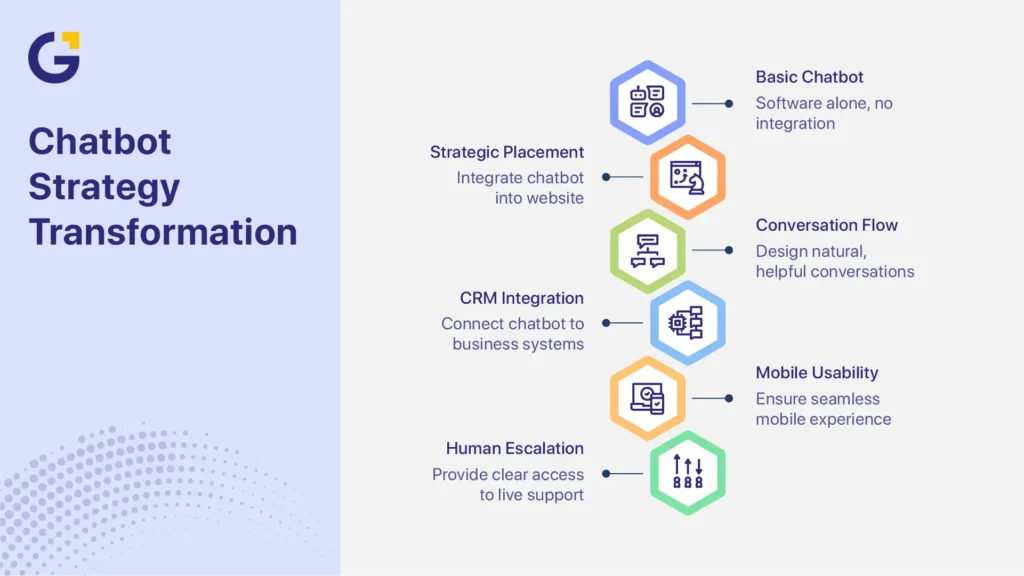
Why Chatbot Strategy Matters More Than the Tool
The chatbot software alone does not create strong results. Performance depends on placement, conversation flow, CRM or booking integration, mobile usability, and clear escalation to human support.
For example, a plumbing business may need suburb filtering and emergency job routing, while a dental clinic may focus more on appointment triage and online bookings. The chatbot should support how the business already handles enquiries and customer communication instead of operating separately from the website experience.
Businesses also need to avoid over-automation. Visitors should always have clear access to phone numbers, booking forms, email, or live support when needed.
AI Chatbot Implementation Checklist
Before adding a chatbot to your website, prepare:
- common customer questions
- service categories
- qualification questions
- booking or quote workflows
- CRM or inbox destination
- escalation rules
- mobile testing
- tracking goals
- follow-up process
- alternative contact options
Planning these details early usually creates a smoother customer experience and better lead quality.
Get Help Choosing the Right AI Chatbot Setup for Your Website
An AI chatbot should do more than answer simple questions. It should help improve lead quality, reduce missed enquiries, support bookings, and simplify customer communication without damaging user experience.
Genix Digital helps Australian SMEs plan and implement chatbot systems designed around real business workflows, including:
- chatbot strategy
- website placement
- conversation flow planning
- CRM integration
- booking automation
- lead tracking
- mobile UX optimisation
- follow-up workflows
- ongoing chatbot optimisation
Whether you run a service business, clinic, ecommerce store, or professional services firm, the right chatbot setup depends on how your business handles enquiries, bookings, and customer follow-up. A properly planned system can help improve response speed, reduce admin handling, and capture more qualified leads.
Businesses wanting to improve lead capture, automate customer enquiries, and reduce missed opportunities can get a free chatbot and website consultation to review their current website experience, lead flow, and chatbot strategy.
FAQs About AI Chatbots for Australian Websites
What can an AI chatbot do on a business website?
An AI chatbot can answer common questions, collect enquiries, qualify leads, support bookings, and route users toward the right service or staff member. Many SMEs also use chatbots to reduce repetitive support work and improve response times.
Is an AI chatbot better than live chat?
Not always. AI chatbots handle repetitive questions and after-hours support, while live chat allows direct human conversations. Many businesses use both together as part of the same support workflow.
Can a chatbot help generate leads?
Yes. A chatbot can collect contact details, ask qualification questions, and guide visitors toward bookings or quote requests. This often improves lead quality and reduces abandoned enquiries.
How much does it cost to add an AI chatbot to a website in Australia?
Costs vary depending on setup complexity, CRM integration, booking workflows, and AI functionality. Basic setups may use simple plugins, while advanced systems usually require custom planning and ongoing optimisation.
Will a chatbot slow down my website?
A properly configured chatbot should not significantly affect website speed. Businesses should still test mobile performance, loading speed, pop-up behaviour, and layout shifts before launch.

 3 Jul 2026
 19 Min Read