


A slow website costs more than a few seconds of loading time. For Sydney businesses relying on their website to generate calls, quotes, or form submissions, speed problems often show up as slow website leads, higher ad costs, and visitors leaving before they even see an offer.
Effective website speed optimisation in Sydney isn’t about chasing a perfect, unrealistic test score. It’s about fixing the specific issues that stop real visitors from taking action, especially when browsing on their phones.
This guide breaks down what actually slows business websites down, how Core Web Vitals fit into the picture, and what to prioritise first if the site runs on WordPress.
If your landing pages feel sluggish or take too long to load key actions, it is time to invest in strategic website speed and performance optimisation before losing more high-intent traffic to faster competitors.
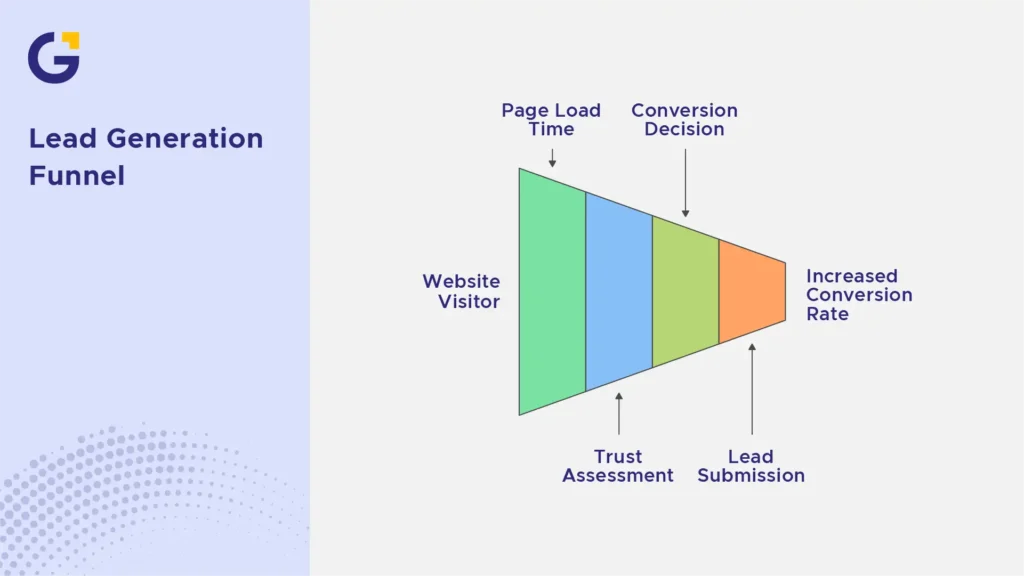
Why Speed Matters for Leads
Most visitors decide within a few seconds whether a website feels trustworthy enough to stay on. If a page takes too long to load, especially on a mobile connection, people simply click away, driving up your bounce rate and tanking your conversion rate
This matters most on pages designed to generate leads, such as contact pages, quote request forms, and dedicated landing pages linked from active marketing campaigns.
Example Case: A visitor searching for a tradesperson taps a Google Ads link, but the landing page takes several seconds to display the contact form. On a mobile connection, that delay is often enough for them to back out and click a competitor’s listing instead.
- Slow-loading contact and quote pages increase drop-off before submission
- Paid traffic becomes less efficient when landing pages are slow, since businesses pay for clicks that never convert
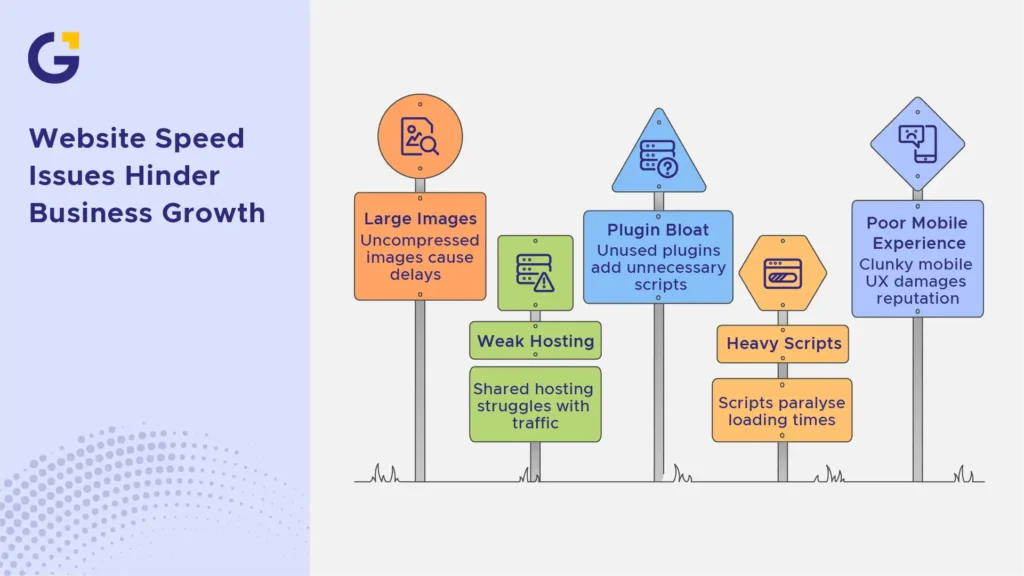
Speed Issues That Usually Hurt Business Websites
Most local corporate websites don’t slow down because of one single catastrophic error. It is usually a combination of smaller, unaddressed technical elements that bottleneck your website performance audit metrics.
Large images and weak hosting
Uncompressed images are one of the most common causes of slow-loading pages. Without proper image compression and image optimisation protocols, a single unoptimised photo can be several megabytes, causing massive delays on local mobile networks.
Your hosting quality matters just as much. Budget, uncalibrated shared hosting plans often struggle under normal daily traffic spikes, causing inconsistent server response times even when the rest of the site code is lightweight.
Plugin bloat and heavy scripts
WordPress sites are especially prone to this technical drag. Every plugin adds some script or stylesheet that the browser has to load, and many business sites accumulate plugins over several years without ever removing unused ones.
Heavy JavaScript from chat widgets, tracking pixels, and visual page builders can also paralyse loading times if they aren’t deferred or loaded efficiently.
Poor mobile experience
Many Sydney businesses get most of their traffic from mobile devices, particularly through Google Ads and local search. If your mobile page speed and general mobile UX aren’t explicitly optimised, the entire site will feel clunky, damaging your digital reputation even if the desktop layout performs perfectly.
- Oversized images with no compression or modern formats
- Outdated or unused plugins are still loading in the background
- Mobile layouts that weren’t tested separately from desktop
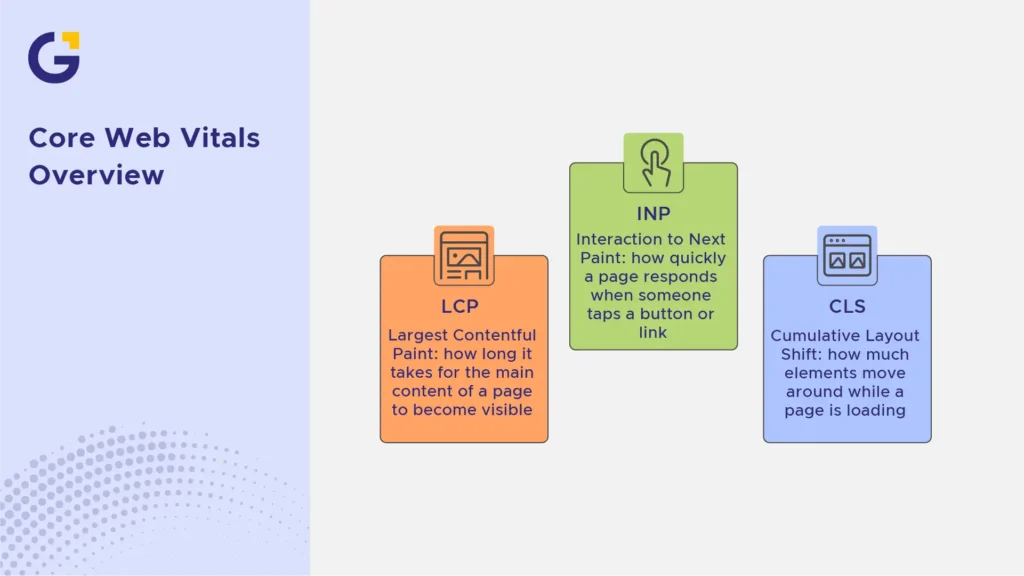
Core Web Vitals in Plain English
Core Web Vitals are a set of metrics Google uses to measure real-world loading performance, responsiveness, and visual stability. They focus entirely on how an actual human visitor experiences the page, rather than artificial lab data.
The three main metrics are:
- LCP (Largest Contentful Paint): how long it takes for the main content of a page to become visible
- INP (Interaction to Next Paint): how quickly a page responds when someone taps a button or link
- CLS (Cumulative Layout Shift): how much elements move around while a page is loading
Example Case: A business page might load quickly at first glance, but if the contact button shifts position as images and ads finish loading, a visitor can accidentally tap the wrong thing. That’s a CLS issue, and it directly affects trust and usability, not just a technical score.
A technical SEO audits for Core Web Vitals approach usually looks at these three metrics together, rather than trying to chase a perfect score on a single test.
Speed, SEO and Google Ads Performance
Google has confirmed that page experience, including loading performance, is one of many factors used in search ranking systems, alongside relevance and content quality, according to Google’s own Search Central documentation.
For paid traffic, speed matters in a different but related way. Google Ads uses landing page experience as part of Quality Score, and a slow landing page can increase cost per click while reducing conversion rates on the same traffic.
Example Case: Two Sydney medical clinics bid on the same local keywords. Clinic A has a highly optimised, lightning-fast landing page, while Clinic B runs a slow site that frustrates mobile users. Clinic B will automatically pay significantly more per click for the same ad placement, while converting far fewer leads.
What to Fix First on WordPress Sites
If your business platform runs on WordPress, achieving a dramatic speed increase usually comes down to resolving a few high-impact structural areas:
- Audit Your Architecture: Audit your active plugins. Delete anything that is non-essential, and replace heavy, outdated extensions with modern, lightweight code alternatives.
- Implement Advanced Caching: Set up page caching and browser caching rules so returning visitors don’t have to download the identical page assets repeatedly.
- Optimise Asset Delivery: Compress every image into next-gen formats (like WebP) before uploading. Utilise a high-tier CDN (Content Delivery Network) to cache your static files closer to your Sydney user base.
- Minify Scripts: Defer non-essential JavaScript and clean up CSS structures so the browser can display the main layout without waiting for complex, secondary scripts to finish running.
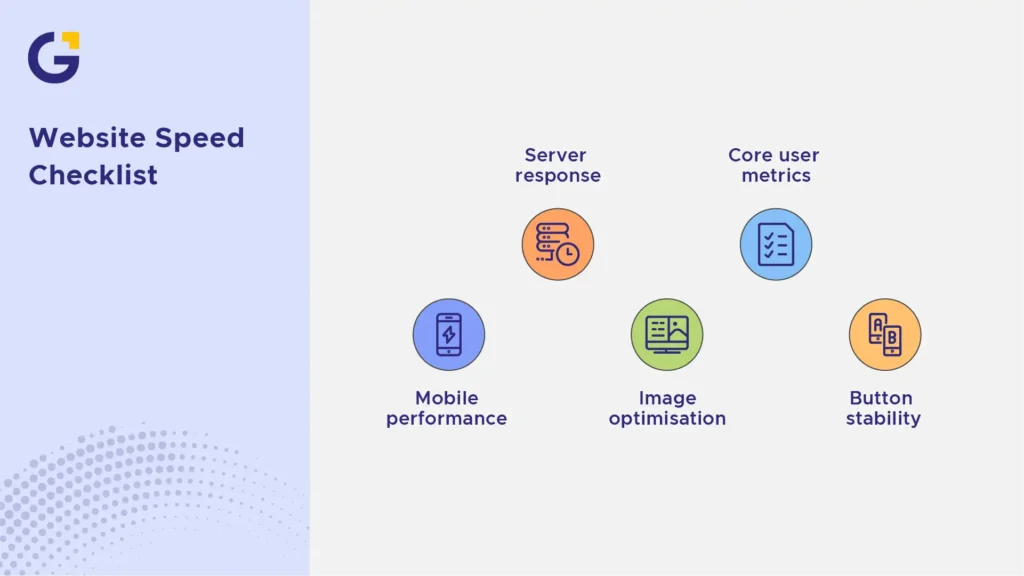
Website Speed Checklist for Sydney Businesses
Ready to convert more traffic into paying clients? Ensure your digital infrastructure meets the following baseline requirements:
- Test your platform’s actual mobile performance using Google PageSpeed Insights.
- Verify that your current web hosting server responds in under 200 milliseconds.
- Ensure all images are compressed and scaled properly for mobile viewports.
- Confirm that your site passes all three core user metrics (LCP, INP, CLS).
- Check that your primary call-to-action buttons never shift vertically while loading.
If your internal team lacks the technical bandwidth to resolve complex script issues or server bottlenecks, partnering with professional web development support for faster business websites ensures your digital platform remains secure, fast, and optimised to capture every potential local lead.
FAQ
What affects website speed the most?
Large images, slow hosting, heavy scripts, too many plugins, poor caching, and unoptimised mobile layouts are common causes of slow business websites.
What are Core Web Vitals?
Core Web Vitals are Google metrics for real-world loading performance, interactivity, and visual stability, including LCP, INP, and CLS.
Does website speed affect leads?
Yes. Slow pages can frustrate users, reduce trust, and increase drop-off before visitors call or submit a form.
Is a perfect PageSpeed score necessary?
No. Focus on real user experience, mobile performance, important page templates, and measurable improvements.
Can WordPress websites be fast?
Yes. WordPress can perform well with good hosting, clean themes, optimised plugins, caching, image compression, and regular maintenance.
Should speed be fixed before running ads?
Often yes. Paid traffic becomes more expensive when landing pages load slowly and fail to convert.





 17 Jun 2026
 16 Min Read