
The best AI website builders in 2026 can help businesses create and launch websites faster. However, the right choice depends on more than design speed. Australian businesses should also consider SEO performance, site ownership, lead generation, scalability, and future integration needs.
For most small businesses, Wix AI is the simplest option for launching a basic website quickly. Webflow AI provides stronger design control and CMS flexibility. Elementor AI combines AI-assisted creation with WordPress ownership, plugin access, and greater SEO scalability.
The best AI website builder for an Australian business should support its current needs without creating unnecessary technical debt later. Before choosing a platform, consider how the website will support content strategy, service page growth, conversion optimisation, CRM tracking, and marketing campaigns.
For Australian SMEs that need help assessing these requirements, Genix Digital offers practical guidance on website and digital growth through a free consultation.
How to Judge an AI Website Builder Properly
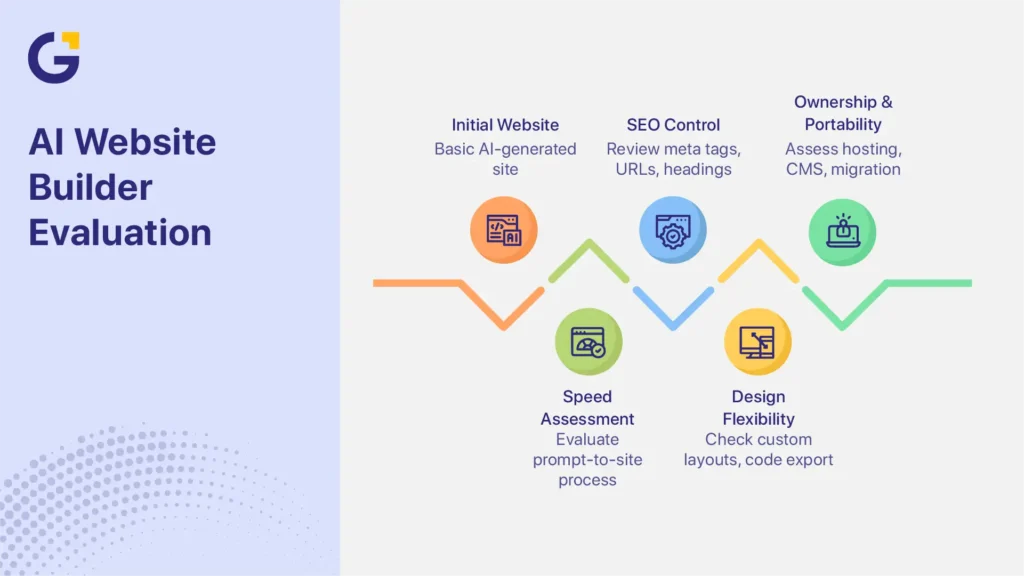
The best AI website builder for business is not always the platform that produces a site the fastest. A useful platform should balance speed, SEO control, design flexibility, ownership, and scalability.
Speed to Launch
Speed is one of the main advantages of using an AI builder.
Most platforms use business details, prompts, templates, and industry data to suggest:
- Page layouts
- Website copy
- Navigation structures
- Images and design elements
- Brand colours and fonts
- Calls to action
This prompt-to-site process can help startups, consultants, sole traders, and local service businesses establish an online presence without a long development cycle.
Wix states that its AI website builder can create personalised website structures and content from conversational prompts. Businesses can then edit the generated design before publishing it.
However, launching quickly does not guarantee that the website will rank, convert visitors, or support future campaigns. Businesses should still review the content, mobile experience, accessibility, page structure, calls to action, and tracking setup.
SEO and Technical Control
An attractive website has limited business value if potential customers cannot find it through search.
When comparing platforms, review how much control each one provides over:
- Meta titles and descriptions
- Page URLs
- Heading structures
- Image alt text
- Canonical tags
- XML sitemaps
- Redirects
- Structured data
- Mobile performance
- Site speed
- Indexing settings
Google’s SEO Starter Guide explains that search performance depends on accessible content, clear site organisation, useful information, and technical signals. A good-looking template cannot replace these foundations.
Built-in SEO tools may be sufficient for a small brochure website. They can become restrictive when a business needs location pages, detailed service pages, content clusters, schema markup, redirect management, or an SEO migration.
Businesses with competitive organic growth goals may need SEO services for business websites to improve site structure, technical performance, content targeting, and search visibility.
Design Flexibility and Ownership
Templates make website creation faster, but they can also limit how far the design can evolve.
Businesses should check whether the platform allows them to:
- Create custom layouts
- Change templates without rebuilding
- Add custom code
- Export website code
- Move content elsewhere
- Connect third-party tools
- Control hosting
- Manage databases or CMS collections
- Add new page types
Site ownership also matters. Some hosted website builders keep the design and functionality inside their own ecosystem. Migrating later may require rebuilding layouts, transferring content, recreating forms, and managing redirects.
WordPress generally gives businesses greater control over hosting, plugins, content, and site files. However, that control comes with additional maintenance responsibilities.
Businesses should weigh convenience against portability before committing to a platform.
Top AI Website Builder Categories
Most web design tools with AI features fit into three broad categories. Each category offers a different balance of simplicity, ownership, CMS control, and scalability.
All-in-One Builders
All-in-one platforms combine hosting, templates, content generation, design tools, and website management in one system.
Examples include:
- Wix AI
- Hostinger AI
- Durable
- Squarespace AI features
These tools are often suitable for:
- Startups
- Sole traders
- Consultants
- Small local businesses
- Businesses needing a simple brochure website
- Short-term campaigns with basic requirements
Their main benefit is convenience. Users can create, host, edit, and publish a site without managing separate software.
However, advanced design control, code export, custom functionality, and technical SEO options may be limited. These restrictions become more important when a business expands its services, locations, integrations, or content strategy.
WordPress AI Builders
A WordPress AI builder combines automated content or layout creation with the flexibility of WordPress.
The Elementor AI website builder can generate copy, layouts, images, code, and design suggestions inside WordPress. It works within Elementor’s visual editor rather than replacing the underlying CMS.
Businesses often choose WordPress AI builders for:
- Greater site ownership
- Flexible hosting choices
- Access to SEO plugins
- Extensive plugin integrations
- Custom post types
- Scalable content publishing
- More control over website files
- Custom development options
The trade-off is maintenance. WordPress websites require updates, security management, backups, plugin checks, and performance monitoring.
Businesses comparing CMS options should review this complete website design guide before selecting a platform. Planning the website structure early can reduce future migration costs and technical debt.
Professional Design Platforms
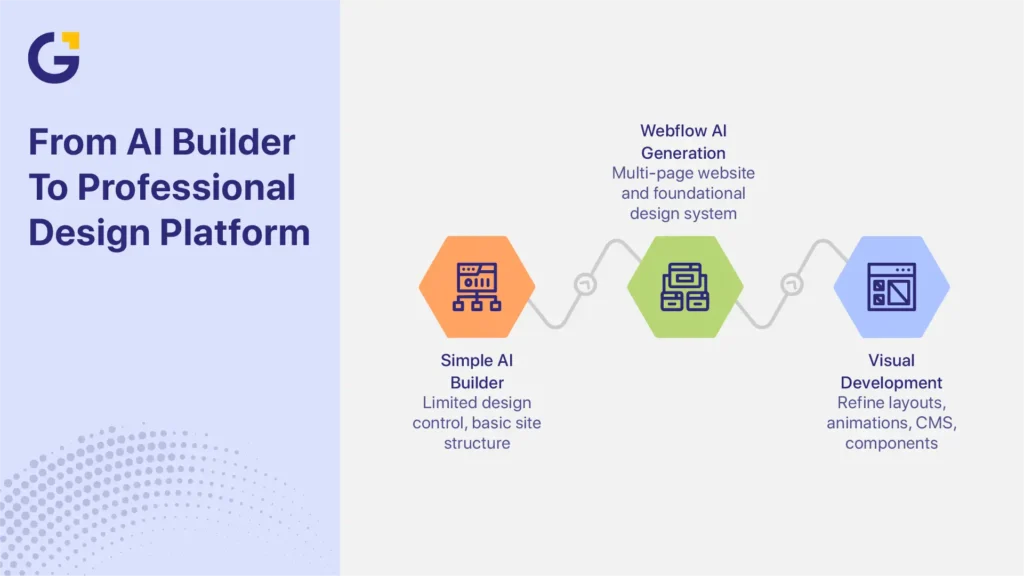
Professional platforms offer stronger design systems, CMS flexibility, custom layouts, and more advanced site structures than simple AI builders.
Webflow AI, for example, can help generate a multi-page website and a foundational design system. Users can then refine layouts, animations, CMS collections, reusable components, and responsive behaviour through Webflow’s visual development environment.
These platforms are useful when a business needs:
- More control over visual presentation
- Custom page layouts
- Consistent brand systems
- Flexible CMS collections
- Detailed responsive design
- Advanced interactions or animations
- Scalable content structures
- Stronger control over landing page design
They generally require more time and technical knowledge than beginner-focused builders. However, they can provide better support for distinct brand presentation, content expansion, and complex site architecture.
| Category | Best For | SEO Control | Design Control | Scalability |
| All-in-One Builders | Beginners and simple brochure websites | Moderate | Moderate | Moderate |
| WordPress AI Builders | Growing businesses and content-led websites | High | High | High |
| Professional Design Platforms | Custom brands and advanced website projects | High | Very high | Very high |
Table takeaway: Choose an all-in-one builder for simplicity, WordPress for ownership and plugin flexibility, or a professional platform for custom layouts, CMS structures, and stronger brand presentation.
Wix AI, Webflow AI and Elementor AI Compared
Wix AI, Webflow AI, and Elementor AI serve different business needs. The right choice depends on whether the priority is launch speed, design control, site ownership, SEO scalability, or integration flexibility.
Which Tool Suits Each
A useful AI website builder comparison should help businesses choose a platform based on practical requirements, not features alone.
Choose Wix AI for Simple Websites and a Fast Launch
The Wix AI website builder is often the most accessible option for beginners.
It is suitable for businesses that need:
- A simple brochure website
- Basic service pages
- A portfolio
- Contact forms
- Appointment booking
- An online presence without technical setup
Wix combines hosting, templates, editing, and website management within one platform. This reduces the number of systems a small business must manage.
Choose Wix AI when ease of use and launch speed matter more than code portability, advanced SEO control, or custom development.
Choose Webflow AI for Design Control and Brand Presentation
The Webflow AI site builder can generate a responsive, multi-page website from a prompt. Users can then refine the design through Webflow’s visual editor and CMS tools.
Webflow AI is well-suited to businesses that need:
- Custom visual layouts
- Distinctive brand presentation
- Flexible CMS collections
- Reusable design components
- Advanced interactions or animations
- Greater responsive design control
- Structured content for future expansion
Choose Webflow AI when design quality, CMS flexibility, and brand presentation matter more than beginner-level simplicity.
Choose Elementor AI for WordPress Ownership and SEO Scalability
The Elementor AI website builder works within WordPress. It can assist with layouts, written content, images, CSS, HTML, and other design tasks.
It is suitable for businesses that need:
- WordPress ownership
- Flexible hosting
- Access to plugins
- Custom integrations
- Scalable service pages
- Ongoing blog publishing
- Advanced SEO tools
- Developer access
- Greater control over website files
Elementor AI is the right choice when the business wants AI-assisted creation without giving up WordPress flexibility, plugin access, or long-term SEO control.
Choose an Agency for Strategy, Integrations, and Lead Generation
Choose an agency when the project involves more than creating and publishing pages.
Professional support is more suitable when the business needs:
- SEO strategy
- Keyword and competitor research
- Lead generation planning
- Conversion-focused copy
- CRM integration
- GA4 and form tracking
- Call tracking
- Landing page optimisation
- Custom development
- Complex website migrations
- Multi-location SEO
- Paid campaign landing pages
The platform is only one part of a growth-focused website. The project also needs clear messaging, a logical customer journey, reliable tracking, and technical implementation.
| Platform | Best For | Ease of Use | SEO Capability | Ownership and Flexibility |
| Wix AI | Simple websites and fast launches | Excellent | Good | Moderate |
| Webflow AI | Custom design and flexible CMS requirements | Moderate | Excellent | High |
| Elementor AI | WordPress, plugins, and content expansion | Good | Excellent | Very high |
| Agency Support | SEO, lead generation, tracking, integrations, and custom development | Managed for the client | Customised | Depends on the platform and agreement |
Table takeaway: Choose Wix AI for simplicity, Webflow AI for design and CMS control, Elementor AI for WordPress flexibility, or an agency when the website must support measurable marketing and operational requirements.
Main Limitations
Each platform has trade-offs.
Wix AI may become restrictive when a business needs extensive custom development, complex site architecture, or greater migration control.
Webflow AI provides more design freedom but has a steeper learning curve. Businesses may need professional support to manage complex CMS structures, custom interactions, or larger websites.
Elementor AI provides WordPress flexibility, but users must manage hosting, plugins, updates, security, backups, and performance.
Businesses should also consider migration risk. As the site gains content, backlinks, rankings, forms, analytics, and integrations, moving to another CMS becomes more complicated.
Migration work may include:
- Rebuilding page templates
- Mapping old and new URLs
- Implementing redirects
- Transferring metadata
- Recreating forms
- Reconnecting analytics
- Testing structured data
- Preserving conversion tracking
- Monitoring ranking changes
A platform with a low upfront cost may become expensive if the business must rebuild the website after its needs change.
When to Avoid DIY
AI website builders work well for straightforward, low-risk projects. They are less suitable when the website must function as a central marketing and sales system.
Consider professional support when the project requires:
- Multi-location or national SEO
- Complex ecommerce functionality
- CRM lead routing
- Custom quoting tools
- Marketing automation
- Advanced analytics
- Membership systems
- Secure customer portals
- Custom dashboards
- Complex migrations
- Multiple campaign landing pages
Australian SMEs may outgrow AI-generated websites within 12 to 18 months as their SEO, tracking, integration, and content requirements become more complex.
Common reasons for rebuilding include:
- Limited technical SEO control
- Weak conversion tracking
- Poor landing page structure
- Difficulty adding service or location pages
- CRM integration limitations
- Incomplete attribution reporting
- Restricted template customisation
- Complicated CMS migrations
- Inconsistent mobile layouts
The original website may still function, but it may no longer support lead generation, content expansion, campaign tracking, or future service growth.
The initial saving may still be worthwhile for a basic website. However, businesses should compare that saving with the future cost of rebuilding pages, migrating SEO assets, and reconnecting marketing systems.
What AI Builders Still Do Badly
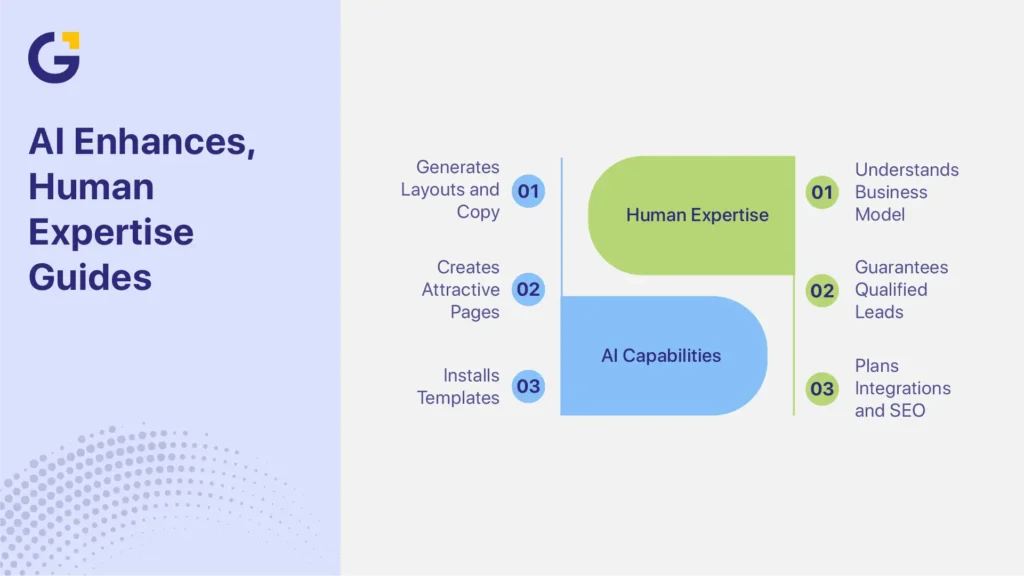
AI builders are improving, but they cannot fully replace business strategy, customer insight, conversion planning, or custom technical implementation.
Business Strategy
AI can produce layouts and draft copy. It does not automatically understand the business model, competitive position, sales process, or customer objections.
For example, a Sydney accounting firm and a local construction company may both need service websites. However, they require different trust signals, content structures, conversion paths, and lead qualification processes.
Effective brand positioning depends on understanding:
- Why customers choose the business
- Which services generate the most value
- What objections prevent enquiries
- How long does the buying process take
- Which locations or audiences matter
- What proof builds trust
- Which actions should count as conversions
AI-generated copy often reflects common industry language. Without careful editing, the website may sound similar to competitors and fail to explain the company’s real value.
Conversion Architecture
An AI landing page builder can generate an attractive page quickly. It cannot guarantee that the page will produce qualified leads.
Conversion architecture determines how visitors move from interest to action.
It includes:
- Clear page goals
- Relevant calls to action
- Trust signals
- Service benefits
- Customer objections
- Form placement
- Lead qualification fields
- Internal navigation
- Testimonials
- Case studies
- Follow-up steps
A page may look polished but still perform poorly because it does not answer the visitor’s questions or guide them toward the next step.
Generating pages is not the same as generating enquiries.
AI-created sites often need improvement in:
- Call-to-action hierarchy
- Landing page messaging
- Trust-building content
- Service page structure
- Form usability
- Mobile conversion flow
- Campaign message alignment
- Conversion reporting
These decisions require an understanding of the audience, offer, traffic source, and sales process.
Custom Integrations and SEO Migrations
Growing businesses often need the website to connect with other systems.
Practical requirements may include:
- GA4 event tracking
- Form submission tracking
- CRM lead routing
- Call tracking
- Attribution reporting
- Automated email follow-up
- Lead scoring
- Booking system integration
- Custom dashboards
- Advertising conversion tracking
For example, a service business may need each form submission assigned to the correct sales representative. A multi-location company may need calls attributed to individual Google Ads or SEO landing pages.
These workflows require more than installing a template.
SEO migrations also require careful planning. Changing platforms without correctly mapping URLs, metadata, redirects, internal links, tracking, and structured data can reduce organic visibility.
Businesses planning significant content expansion or custom integration work should assess these requirements before committing to a platform.
Agency vs AI Builder Decision Framework
AI builders and agencies solve different problems. The right choice depends on the website’s role, complexity, and business risk.
Budget
AI builders generally reduce the initial cost of creating a website. This makes them attractive to startups and small businesses with limited budgets.
However, the subscription price does not represent the full cost.
Businesses should also consider:
- Staff time
- Learning and setup
- Copywriting
- Image preparation
- SEO configuration
- Tracking implementation
- Maintenance
- Plugin or app fees
- Redesign requirements
- Migration costs
A low upfront cost may lead to higher future expenses if the business later needs:
- A complete redesign
- An SEO migration
- CRM integration
- Conversion tracking
- Landing page optimisation
- Stronger technical SEO
- Custom functionality
- New service or location templates
For a simple brochure site, the short-term savings may justify the limitations. For a website expected to generate leads, support paid campaigns, or expand through SEO, rebuilding later may cost more than planning the right structure from the beginning.
Growth Goals
AI builders are suitable for simple brochure websites that explain basic services, show contact details, and provide an online presence.
Professional support is more suitable when the website must support:
- SEO growth
- Lead generation
- Service page expansion
- Location page creation
- Campaign landing pages
- Content publishing
- CRM tracking
- Conversion reporting
- Paid advertising
- Marketing automation
For example, a local consultant may only need five pages and a contact form. Wix AI may meet that need.
A trades business targeting several Sydney suburbs may need location pages, service pages, call tracking, quote forms, and Google Ads landing pages. That project requires a more deliberate site structure.
The decision should be based on what the website must accomplish during the next two or three years, not only what is needed on launch day.
Need for Custom Tracking and Automation
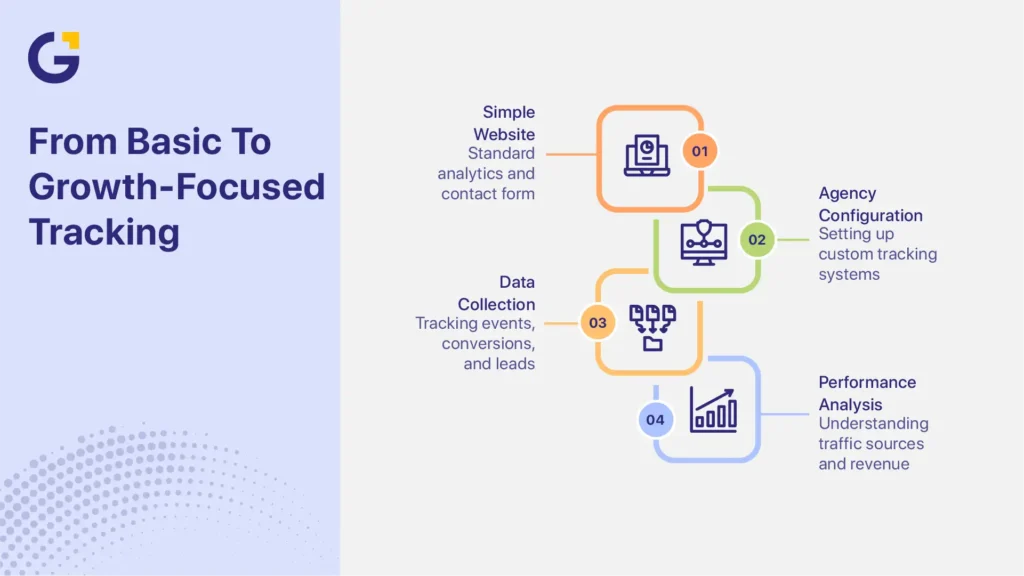
Simple websites may only need standard analytics and a contact form. Growth-focused businesses often need detailed tracking across multiple channels and systems.
An agency can help configure:
- GA4 event tracking
- Google Tag Manager
- Form conversion tracking
- Phone call tracking
- CRM lead routing
- Google Ads conversions
- Meta Pixel events
- Attribution reporting
- Automated follow-up workflows
- Custom reporting dashboards
These systems help business owners understand which pages, campaigns, keywords, and channels generate enquiries or sales.
Without reliable tracking, a website may receive traffic without showing whether that traffic produces revenue.
| Requirement | AI Builder | Agency Solution |
| Basic brochure website | Excellent | Good |
| Fast initial launch | Excellent | Good |
| Advanced technical SEO | Limited to good | Excellent |
| Lead-generation strategy | Moderate | Excellent |
| CRM integration | Limited to moderate | Excellent |
| Conversion tracking | Basic to moderate | Excellent |
| Custom automation | Limited | Excellent |
| Landing page optimisation | Moderate | Excellent |
| Long-term scalability | Moderate | Excellent |
| Custom development | Limited | Excellent |
Table takeaway: Use an AI builder when the website is simple and low-risk. Use an agency when SEO, tracking, conversion strategy, integrations, or long-term scalability are important.
Genix Digital’s AI website development services can help Australian SMEs plan and build websites around search visibility, customer journeys, tracking, integrations, and lead generation.
Conclusion
The best AI website builders in 2026 make website creation faster, but speed should not be the only deciding factor.
Wix AI is a practical choice for simple websites and fast launches. Webflow AI provides stronger design control, CMS flexibility, and brand presentation. Elementor AI is better suited to businesses that want WordPress ownership, plugin flexibility, and scalable SEO options.
An agency is the better choice when the website must support lead generation, technical SEO, conversion tracking, CRM integration, custom development, or ongoing service page growth.
Before choosing a platform, define what the website must achieve now and what it may need to support over the next few years. This helps reduce technical debt, migration problems, and unnecessary rebuilding costs.
Australian SMEs can ask which AI website builder is right for you through a free consultation with Genix Digital. The team can review your website requirements, SEO goals, tracking needs, and future growth plans before recommending a suitable approach.
FAQs
What Is the Best AI Website Builder in 2026?
The best AI website builder in 2026 depends on the project. Wix AI is best for simple websites and beginners. Webflow AI suits businesses that need greater design and CMS control. Elementor AI works well for WordPress ownership, plugins, and SEO scalability.
Are AI Website Builders Good for SEO?
AI website builders can support basic SEO tasks such as metadata, mobile responsiveness, sitemaps, headings, and image alt text. However, some platforms become restrictive when businesses need advanced schema, redirect management, location pages, custom site structures, or large-scale content expansion.
Is Wix AI Better Than WordPress AI Builders?
Wix AI is easier to set up and manage for a simple website. WordPress AI builders such as Elementor AI provide greater control over hosting, plugins, site files, technical SEO, and future customisation. The better option depends on whether simplicity or long-term flexibility matters more.
Can AI Website Builders Replace Web Designers?
AI website builders can automate layouts, initial copy, images, and basic design tasks. They cannot fully replace customer research, brand positioning, conversion optimisation, custom integrations, technical SEO, or strategic website planning.
Which AI Website Builder Is Best for Small Businesses?
Wix AI is often the best choice for small businesses that need a simple website quickly. Webflow AI is better for custom brand presentation, while Elementor AI suits businesses that expect to expand their content, services, integrations, or SEO strategy.





 14 Aug 2026
 8 Min Read