

An AI WordPress website can use artificial intelligence to support content drafting, layout ideas, enquiry classification, and other tasks that require language or pattern analysis. In addition, it may also use standard automation to route forms, update a CRM, send reminders, and notify staff.
However, these are not the same thing.
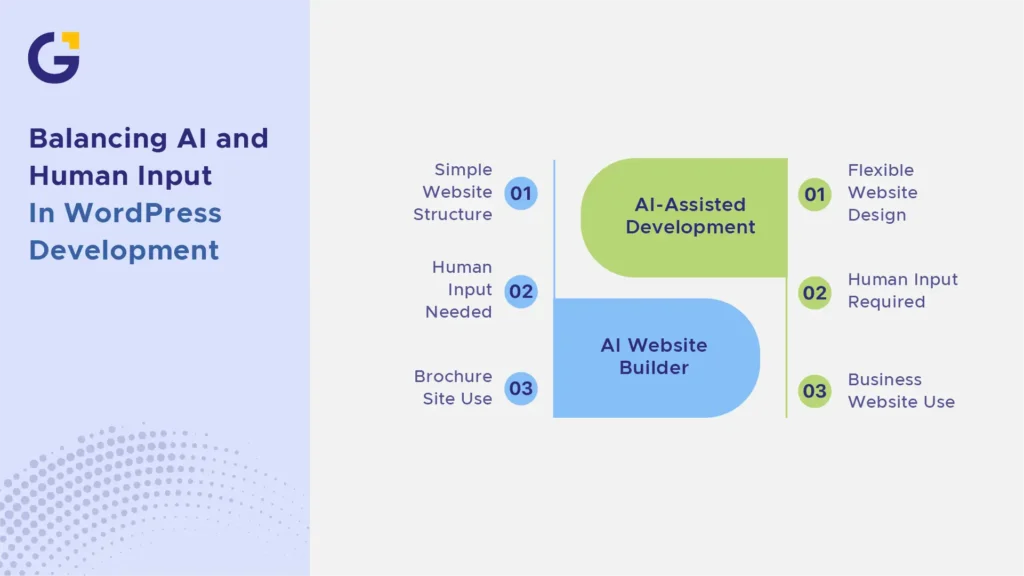
A third model is an AI website builder that generates an initial website from a prompt. This may suit a simple DIY project, but it is different from having professionals use AI during WordPress development or adding AI features to a completed business website.
For example, AI interprets information, drafts content, summarises enquiries and recommends actions. By comparison, automation follows predefined rules.
Understanding these differences helps small businesses choose the right tools without confusing AI with every digital workflow.
What Does an AI WordPress Website Mean?
The term “AI WordPress website” can describe three different approaches:
- An AI website builder that generates pages, layouts and draft copy.
- An AI-assisted WordPress development process where designers, developers, and writers use AI to work more efficiently.
- An AI-enabled business website that uses AI features after launch, such as conversational assistance, enquiry summaries or recommendations.
A business may use one, two, or all three models. The right approach depends on the website’s purpose, the level of risk and the systems it needs to connect with.
Businesses still choosing a platform can review Genix Digital’s AI website builder guide for a deeper comparison of builder options. This article focuses on what to automate after choosing WordPress and where human approval is still needed.
| Website model | Best use case | What AI can realistically do | What still needs human input | When to avoid relying on DIY |
| AI website builder | A simple brochure site, portfolio, or early business website | Generate an initial structure, layout, colours, images, and draft copy | Service accuracy, branding, mobile review, SEO setup, accessibility, and calls to action | When the site needs complex integrations, competitive SEO, custom tracking, strong lead generation, or future expansion |
| AI-assisted WordPress development | A business that wants WordPress flexibility with professional planning and implementation | Speed up research, content outlines, layout exploration, code assistance, and repetitive production work | Strategy, UX, final copy, plugin selection, custom development, testing, and launch approval | When there is no clear project owner, business brief, or process for reviewing generated work |
| AI-enabled business website | An established website that needs smarter customer or internal workflows | Classify enquiries, summarise form details, support conversational search, or recommend relevant information | Privacy decisions, system rules, escalation paths, accuracy checks, and ongoing monitoring | When customer data is sensitive, internal data is unreliable, or the business cannot handle errors and exceptions |
The table also shows why an “AI website” is not one standard product. A business may use an AI builder without adding any post-launch AI features. Another may have a professionally built WordPress site that uses standard automation but very little AI.
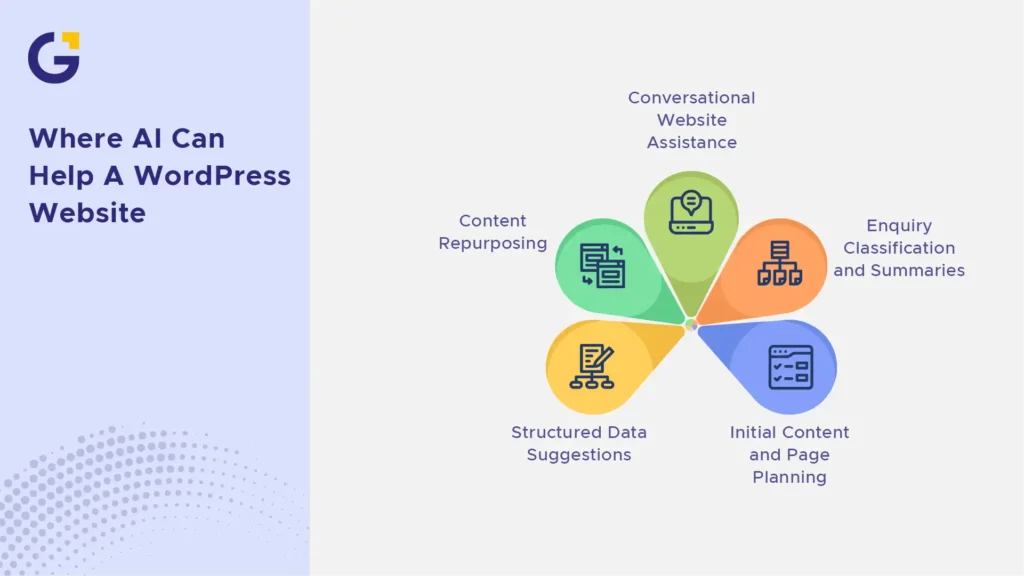
Where AI Can Help a WordPress Website
AI can help a WordPress website when a task involves drafting, summarising, classifying, comparing or making a recommendation from available information. It works best when the business provides reliable inputs and a person can review the result before it affects a customer or business decision.
Initial Content and Page Planning
AI can create starting drafts for:
- Page outlines
- Service descriptions
- Headline options
- Calls to action
- Blog summaries
- Customer-question lists
- Internal-link suggestions
- Draft image alt text
These outputs can reduce the time needed to create a first version. They should not be treated as finished website copy.
Google advises that generative AI can help with research and structure, but publishing large amounts of generated content without adding value may conflict with its spam policies. The value of the final page still depends on accuracy, usefulness, and original business information.
Enquiry Classification and Summaries
AI may help interpret free-text enquiries that do not fit simple form rules.
For example, an AI integration could:
- Identify the likely service category
- Summarise a long enquiry for a salesperson
- Flag language that suggests urgency
- Recommend an internal knowledge-base article
- Suggest which team should review the request
The final routing rules should still include clear limits. A low-confidence or unusual enquiry should go to a monitored queue rather than being assigned automatically without review.
Conversational Website Assistance
An AI assistant may answer common questions using approved website information or guide users towards a relevant service page.
This can be useful when customers need help finding information outside business hours. However, the assistant should clearly state its limits and provide an easy way to contact a person.
Businesses should define:
- Which sources the assistant may use
- Which questions it may answer
- Which topics require human support
- What it should do when it is uncertain
- Whether conversations are stored
- Whether personal information is sent to another system
An AI assistant should not invent pricing, availability, guarantees or service advice that the business has not approved.
Content Repurposing
AI can turn an approved article into starting drafts for:
- Email newsletters
- Social posts
- Short website summaries
- Sales-team notes
- FAQ content
- Video or podcast outlines
A person should adapt each version to the platform and audience. Copying the same generated text across every channel can make the content repetitive and remove useful context.
Structured Data Suggestions
AI tools can suggest structured data, but implementation should follow Google Search documentation rather than treating Schema.org as the main guide for search visibility.
Google supports structured data for specific search features and page types. Depending on the page, suitable markup may include Organisation, LocalBusiness, BreadcrumbList, Article, or Product structured data.
The markup must accurately represent information that is visible on the page. Valid structured data only makes a page eligible for supported search features. It does not guarantee a rich result, higher rankings or inclusion in AI-generated responses.
FAQ content can still help users, but FAQ markup should not be treated as a standard visibility tactic for a business website. Google limits FAQ rich results mainly to well-known government and health websites.
There is also no special AI schema, AI markup or machine-readable file required for Google AI Overviews or AI Mode. Google says the existing foundations still apply: indexable pages, crawlable content, useful information, sound SEO practices, and good page experience measured through Core Web Vitals. Businesses working on these wider foundations can learn more about Genix Digital’s approach to AI SEO and structured website optimisation.
What Should Still Be Human-Led
Strategy, positioning, final copy, user experience, and launch approval should remain human-led. These decisions depend on customer knowledge, commercial priorities, and accountability.
AI can organise the available information. It cannot decide whether the information represents the business honestly or whether the final website supports the right customer journey.
Strategy, Positioning, and Brand Message
Positioning explains why a customer should choose one provider instead of another.
AI cannot determine this from a short prompt or a scan of competitor websites. It needs real information about:
- Who the business serves
- Which problems it solves
- How its service is delivered
- What customers value most
- Which objections delay enquiries
- What proof supports its claims
- Which outcomes it can credibly promise
Without these inputs, generated copy often falls back on phrases such as “tailored solutions,” “quality service” and “customer-focused results.”
These phrases may sound professional, but a competitor could reuse them without changing anything.
AI can organise customer research or compare messaging options. A business owner or strategist should decide which message reflects the company’s real strengths.
Final Copy, UX and Conversion Judgement
AI can suggest layouts, headings, and calls to action. It cannot independently confirm that those choices fit the customer’s level of awareness or the business’s sales process.
Human review should consider:
- Whether the main call to action fits the visitor’s readiness
- Whether common objections are answered
- Whether the form requests too much information
- Whether trust signals appear before the customer must act
- Whether the mobile journey is easy to complete
- Whether the next step is clear
- Whether the page helps the business attract suitable enquiries
Ultimately, analytics, customer conversations, sales feedback, and usability testing should guide these decisions.
Human Copy Review Checklist
Before publishing AI-assisted copy, review each page against the following questions:
| Review point | Question to ask |
| Claim accuracy | Can the business prove every result, qualification, comparison and performance claim? |
| Service scope | Does the copy accurately explain what is included, excluded and available in each location? |
| Brand voice | Does the page sound like the company’s real emails, proposals and customer conversations? |
| Customer objections | Does it answer the concerns that commonly stop customers from enquiring? |
| Pricing references | Are all prices, ranges, fees, and conditions current and properly explained? |
| CTA suitability | Does the requested action match what the visitor is ready to do? |
| Original value | Does the page include real processes, insights, or proof that a competitor could not reuse unchanged? |
Content involving legal, medical, financial or other sensitive claims may need review from an appropriate subject-matter expert before publication.
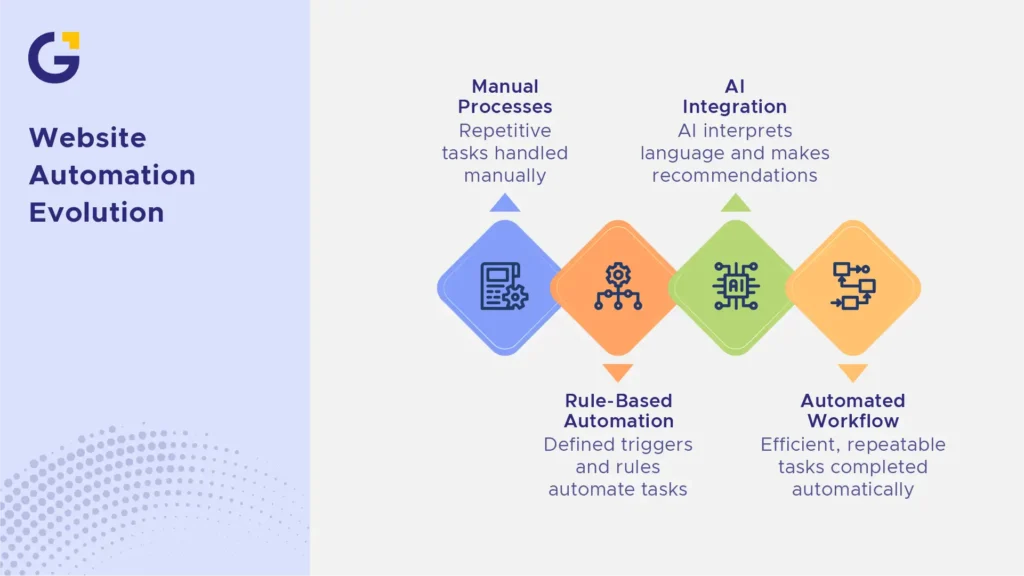
Useful Automations for Small Business Websites
Website automation uses defined triggers and rules to move information between systems or complete repeatable tasks. It does not always involve AI.
Form routing, CRM updates, booking reminders, and email triggers are usually standard automations. AI only becomes part of the workflow when the system must interpret language, classify information, create a summary, or make a recommendation.
Form and CRM Automation
A form submission may automatically:
- Create or update a CRM contact
- Record the lead source
- Assign a service category
- Notify the correct employee
- Create a follow-up task
- Send an acknowledgement email
For example, a Sydney commercial cleaning company could ask for a contact name, postcode, property type, and preferred service.
Rules could then:
- Send the enquiry to the CRM.
- Assign it to a team based on postcode and property type.
- Send the customer a confirmation email.
- Create a follow-up task.
- Place incomplete or unusual enquiries in a monitored review queue.
This workflow is mostly rule-based automation.
AI could be added to summarise a long description or suggest a category when the customer selects “other.” The AI result should not replace the rules for ownership, follow-up, and exception handling.
Booking and Reminder Automation
A booking workflow may let a customer select an available time, receive a confirmation, add the appointment to a calendar, and receive a reminder.
The business must still decide:
- Which services can be booked online
- Which calendars show real availability
- How cancellations work
- When staff approval is needed
- What happens after a failed booking
- Who monitors booking errors
At the same time, automation should reduce avoidable administration without making it harder for customers to reach a person.
Email Triggers
A website may send a message after a customer:
- Submits an enquiry
- Requests a quote
- Downloads a resource
- Books an appointment
- Makes a purchase
- Joins an email list
Each message should match the action taken.
Someone requesting a quote needs different information from someone downloading a general guide. The email should also make it clear what happens next and when the customer can expect a human response.
Internal Notifications
Internal notifications can alert staff when:
- A high-value enquiry arrives
- A form includes an urgent selection
- A booking fails
- A CRM record cannot be created
- A payment event does not complete
- An integration stops responding
Likewise, notifications should be limited to information that requires action. Too many alerts can make important messages easier to miss.
Analytics and Conversion Tracking
Automation can help record actions such as:
- Form submissions
- Phone-number clicks
- Booking completions
- Quote requests
- Purchases
- Email sign-ups
The tracking must be tested before the data is used for decisions. The team should check that events fire once, use the correct definitions, and do not collect information that should not be sent to an analytics platform.
Businesses that need help connecting websites, tracking, and business systems can review Genix Digital’s website development support for Australian businesses.
Data-Handling Checklist for Forms, CRMs and AI Integrations
Before connecting a form to a CRM, automation platform, or AI service, confirm:
- What is collected: Request only the information needed for the stated purpose.
- Where it is sent: Document every system, integration, and third-party service that receives the data.
- Who can access it: Limit staff and supplier access to people who need the information.
- How long it is kept: Define a retention period and a process for deleting information that is no longer required.
- What happens if the integration fails: Create an error log, an alert, and a manual recovery process.
- What the customer is told: Provide an appropriate privacy notice and consent process where required.
- Whether AI is involved: Check whether personal information is being sent to an AI provider and how that provider stores or uses it.
- How exceptions are handled: Define what happens when information is incomplete, unclear or incorrectly classified.
Australian organisations should confirm whether the Privacy Act and Australian Privacy Principles apply to them. The OAIC states that covered organisations should collect only personal information that is reasonably necessary for their functions. It also recommends not entering personal information, particularly sensitive information, into publicly available generative AI tools because of the privacy risks involved.
Do Not Automate Yet
Automation should begin only after the underlying business process is clear.
Do not automate the workflow yet when:
- Service positioning is unclear. Automation cannot fix a website that does not clearly explain what the business offers or who it serves.
- There is no defined lead process. The team must know what should happen after each type of enquiry.
- No one owns the follow-up. Every workflow needs a named person or role responsible for the next action.
- CRM data is unreliable. Duplicate contacts, unclear fields, and inconsistent stages will spread errors across connected systems.
- Forms have not been tested. A broken or confusing form should be fixed before its submissions are routed elsewhere.
- There is no exception process. The team needs a plan for failed bookings, incomplete details, unusual requests, and incorrect classifications.
- Customer information is not properly controlled. The business should understand where form data is sent before adding more integrations.
- The manual process changes every week. Automating an unstable process usually creates more maintenance, not less.
A useful rule is to make the process reliable manually before trying to automate it.
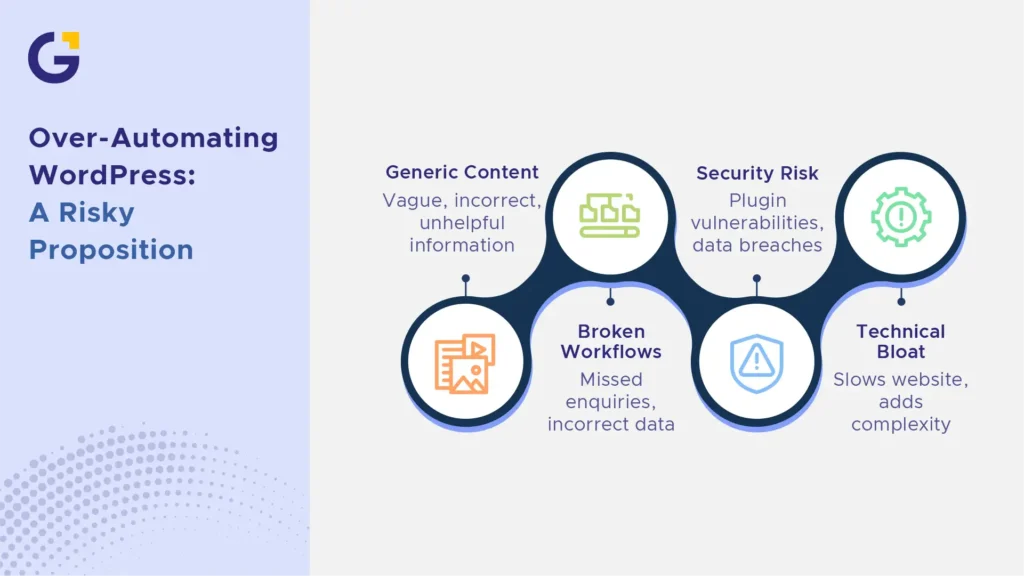
Risks of Over-Automating WordPress
Over-automating WordPress can create generic content, unreliable customer journeys, privacy problems, and unnecessary technical complexity.
Each new plugin, API, and external platform adds another dependency that must be maintained.
Generic or Inaccurate Content
AI-generated content may sound polished while still being vague or incorrect.
Common problems include:
- Unsupported claims
- Outdated service information
- Generic benefits
- Incorrect locations
- Invented pricing details
- Calls to action that do not match the service
- Advice that lacks important limits
A website can contain many words without helping a customer understand why the business is the right choice.
Broken Workflows
A failed automation may not be obvious until enquiries have already been missed.
Examples include:
- Leads entering an unmonitored inbox
- Booking times not matching staff calendars
- CRM records being created without an owner
- Confirmation emails going to the wrong segment
- Duplicate contacts triggering several messages
- Failed form submissions not creating an alert
Therefore, important workflows need visible error reporting and a manual fallback.
Security and Plugin Risk
WordPress security should not depend on one plugin.
A broader maintenance process should cover:
- Controlled WordPress, theme and plugin updates
- Current and tested backups
- Limited administrator access
- Strong passwords and multi-factor authentication
- Review of plugins and external connections
- Testing after important changes
- Removal of unused themes, plugins and accounts
- A recovery process for failed updates or integrations
Official WordPress guidance recommends backing up a site before updates, keeping software current, and installing plugins and themes from trusted sources, such as the WordPress Plugin Directory.
Technical Bloat
Automation plugins and third-party tools may load scripts, styles or external requests across the website.
Before adding another tool, ask:
- Does it solve a defined business problem?
- Is the feature already available elsewhere?
- Does it load on pages where it is not needed?
- Does it create another subscription or external dependency?
- Who will maintain it?
- Can it be removed without breaking the customer journey?
The simplest reliable workflow is often better than a complex setup that no one understands.
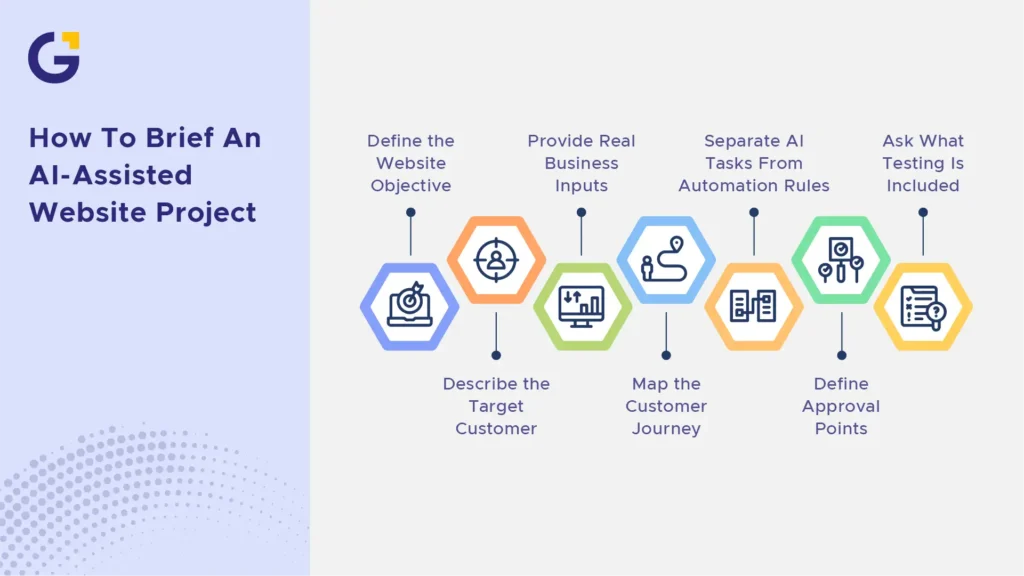
How to Brief an AI-Assisted Website Project
A strong AI-assisted website brief should explain the business goal, customer journey, required systems, use of AI, and human approval points.
1. Define the Website Objective
State whether the website should:
- Generate qualified enquiries
- Increase bookings
- Sell products
- Support a sales team
- Reduce repetitive questions
- Improve search visibility
- Connect marketing activity with a CRM
From there, the objective should guide the structure, content, calls to action, and automation plan.
2. Describe the Target Customer
Include:
- The problem they need to solve
- What they already understand
- What concerns them
- What they compare before choosing
- What proof they need
- What action they are ready to take
Behaviour, objections, and decision criteria are usually more useful than broad demographics.
3. Provide Real Business Inputs
Useful inputs may include:
- Approved service information
- Customer emails
- Sales proposals
- Call notes
- Existing website pages
- Testimonials
- Pricing documents
- Internal processes
- Common questions and objections
In addition, explain which examples represent the preferred voice and why.
4. Map the Customer Journey
Show:
- Where visitors enter the website
- Which pages they may view
- What information they need first
- The primary conversion action
- What happens after an enquiry
- Which system records the lead
- Who is responsible for responding
5. Separate AI Tasks From Automation Rules
List which tasks use AI and which follow fixed rules.
For example:
| AI-assisted task | Rule-based automation |
| Summarising an enquiry | Creating a CRM record |
| Classifying free-text information | Assigning a postcode to a sales region |
| Conversational website assistance | Sending a confirmation email |
| Recommending related content | Creating an internal follow-up task |
| Drafting content options | Sending a booking reminder |
As a result, this distinction makes testing and accountability easier.
6. Define Approval Points
State who approves:
- Website strategy
- Page structure
- Final copy
- Claims and pricing
- Visual design
- Calls to action
- Plugin selection
- AI responses
- Automation rules
- Analytics setup
- Launch
7. Ask What Testing Is Included
The provider should be able to explain:
- How forms are tested
- How integrations are checked
- How failed workflows are reported
- How generated content is reviewed
- How mobile layouts are tested
- How performance is checked
- How updates and backups are managed
- What support is available after launch
Genix Digital’s WordPress development service lists discovery and planning, wireframing and design, development, integrations, testing, launch support and optional ongoing maintenance. These are clearer and more supportable service claims than describing every website as “AI-ready.”
Staged WordPress Automation Rollout
Small businesses should not switch on every integration at once.
A staged rollout makes errors easier to find and reduces the effect of a failed workflow.
Stage 1: Choose One High-Value Workflow
Start with a repeatable task that has:
- A clear trigger
- A clear desired result
- A named owner
- Measurable value
- A manageable level of risk
A quote-request workflow is often a better starting point than a complex chatbot connected to several systems.
Stage 2: Map the Process and Data
Document:
- The form or trigger
- The information collected
- Each connected system
- The rules that move the data
- Any AI processing
- The responsible team member
- The required customer response
- The failure and escalation path
Stage 3: Build and Test in Staging
Test the workflow away from the live website where possible.
Check:
- Standard submissions
- Missing information
- Incorrect formats
- Duplicate contacts
- API failures
- Delayed messages
- Mobile forms
- Internal notifications
- Customer emails
- Privacy disclosures
Stage 4: Confirm Internal Ownership
Make sure the responsible team knows:
- What the workflow does
- Where to find the data
- Which alerts require action
- How to correct an error
- Who to contact when the integration fails
Stage 5: Launch With Monitoring
After launch, review:
- Whether every test submission arrived
- Whether leads were assigned correctly
- Whether customers received the right response
- Whether staff followed up
- Whether errors were logged
- Whether the workflow saved time
Stage 6: Add the Next Automation
Only add another workflow after the first one is stable, useful, and understood by the team.
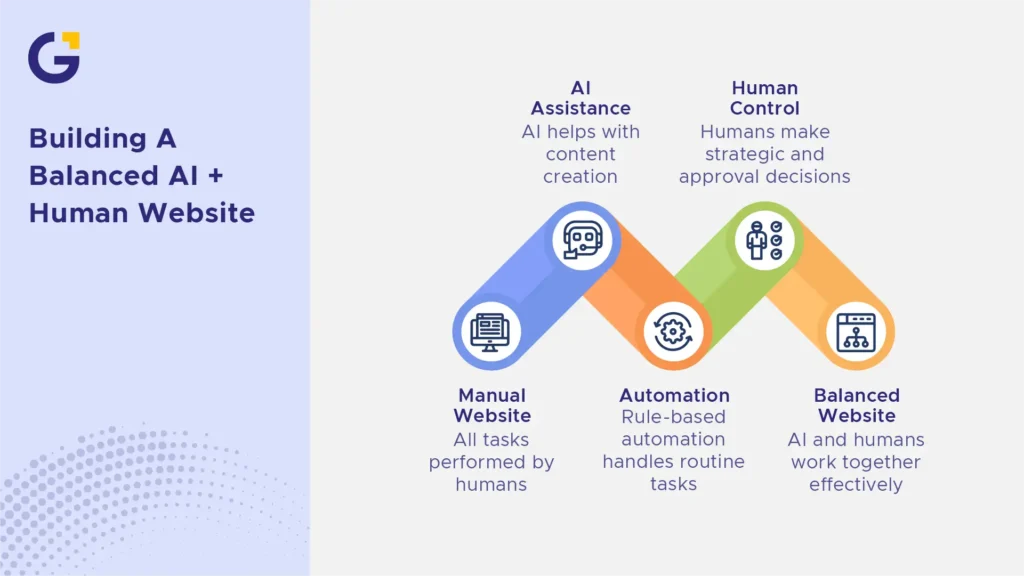
A Balanced AI + Human Website Checklist
A balanced AI WordPress website uses AI where interpretation or drafting adds value, automation where rules are clear, and human approval where business judgement is required.
AI Can Assist With
- Initial page outlines
- Draft content blocks
- Headline and CTA options
- Enquiry summaries
- Free-text classification
- Conversational assistance
- Internal-link suggestions
- Content repurposing
- Structured data suggestions
- Draft alt text
Standard Automation Can Handle
- Form routing
- CRM record creation
- Lead-source recording
- Booking confirmations
- Appointment reminders
- Follow-up tasks
- Internal notifications
- Email triggers
- Conversion-event recording
- Workflow failure alerts
Humans Should Control
- Business strategy and positioning
- Final copy and claim approval
- Customer-facing brand voice
- Pricing and service packaging
- UX and conversion decisions
- Privacy and consent decisions
- Plugin and integration selection
- Technical QA
- Exception handling
- Launch approval
Before Launch
- Confirm which workflows use AI and which use rule-based automation.
- Test forms on mobile and desktop.
- Check every CRM field and routing rule.
- Review customer and internal emails.
- Test failed and incomplete submissions.
- Confirm data access and retention settings.
- Check the privacy notice and consent process.
- Review all customer-facing AI responses.
- Confirm that a person owns each follow-up action.
- Create a manual fallback for important workflows.
After Launch
- Monitor errors and missed enquiries.
- Review AI classifications for accuracy.
- Test important forms regularly.
- Check analytics and conversion events.
- Review access to connected systems.
- Install updates through a controlled process.
- Remove unused plugins and integrations.
- Review customer questions and objections.
- Update content when services or prices change.
- Add new automation only after the current workflow is stable.
Conclusion
An AI WordPress website should not automate every possible task.
Use AI where drafting, summarising, classification or conversational support creates a clear benefit. Use standard automation for repeatable workflows with defined rules, such as form routing, CRM updates, reminders and internal notifications.
Keep positioning, final copy, customer experience, privacy decisions, and launch approval human-led.
The practical takeaway is simple: automate repeatable tasks with clear rules, keep customer-facing strategy and approval in human hands, and test every workflow before the business depends on it.
Businesses planning a WordPress website with forms, CRM connections, booking tools or carefully selected AI features can contact Genix Digital to discuss the project requirements, approval points and rollout plan.
FAQs
Can AI build a WordPress website?
AI can assist with page structures, layouts, draft copy, images, and code suggestions. It can speed up parts of the process, but it does not replace business strategy, UX planning, technical implementation, accurate service information, or final quality control.
What should be automated on a WordPress website?
Useful automations include form routing, CRM updates, booking confirmations, appointment reminders, email triggers, and internal notifications. These are normally rule-based workflows rather than AI. Each automation should solve a clear problem and have a named owner.
What should not be fully automated?
Brand positioning, final service copy, compliance-sensitive claims, pricing decisions, UX, privacy decisions and technical QA should not be left entirely to AI. These areas require business context, customer knowledge, and accountability.
Is an AI WordPress website good for SEO?
It can support SEO when the site has crawlable content, a clear structure, useful information, fast performance, and human-reviewed accuracy. AI does not guarantee rankings or AI visibility, and Google does not require special AI markup or schema.
Can AI make a website sound generic?
Yes. AI-generated copy often becomes vague when it lacks real customer language, service details, proof, and brand examples. Human editors should add information that reflects how the business actually works and what makes it different.
What is the safest AI website workflow?
Start with one low-risk, high-value use case. Map the data flow, build and test it in staging, assign an internal owner, create a failure process, and monitor the results after launch. Add more AI or automation only after the first workflow is reliable.




 1 Oct 2026
 8 Min Read